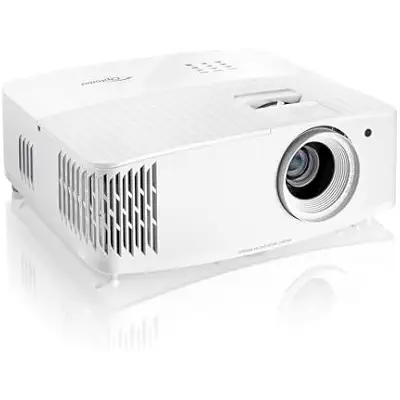
Optoma UHD35X Technology 3600-Lumen UHD 4K DLP Projector - White
Compare.Deals receives a small fee if you shop through our links at no extra cost to you.
Affiliate Disclosure
| Store | Details | Price | Buy Now |
|---|---|---|---|

Disclaimer: While we strive for accuracy, we cannot guarantee that all product features listed are complete or error-free. Please confirm the product details with the retailer before making a purchase.
Brand
Optoma
Model
UHD35X
GTIN
00796435814397
Optoma UHD35X Buying Guide
Who It's For
The Optoma UHD35X is a fantastic pick for a few specific crowds. Gamers will love its super-low input lag of 15.7ms and high refresh rates up to 240Hz at 1080p, making fast-paced games feel smooth and responsive. Home theater buffs will appreciate the crisp 4K resolution and HDR support, which bring movies to life with sharp details, especially in rooms with some light sneaking in. It’s also a great fit for folks with smaller spaces, thanks to its wider lens that lets you project a big image without needing a huge room. If you’re after a versatile projector for movies, gaming, or casual viewing in a living room, this one’s got you covered.
Pros/Cons
Pros:
Cons:
- Bright as daylight: 3,400 ANSI lumens means you can watch in rooms with ambient light without losing image quality.
- Sharp 4K visuals: True 4K resolution via Pixel Shift tech delivers crisp, detailed pictures for movies and games.
- Gamer’s dream: Low input lag and high refresh rates make it perfect for competitive gaming.
- Easy to place: The wider lens is a lifesaver for smaller rooms or tight setups.
- Long-lasting: Up to 15,000 hours of lamp life in eco mode means fewer replacements.
Cons:
- Weaker contrast: The 500,000:1 contrast ratio can make dark scenes look a bit flat compared to pricier models.
- Color tweaking needed: Colors are vibrant but may need calibration for true accuracy.
- No smart features: You’ll need a streaming stick or console for Netflix and other apps.
Features
The Optoma UHD35X is loaded with features that make it a standout. Its true 4K UHD resolution uses Pixel Shift to deliver 3840 x 2160 pixels, giving you razor-sharp images. With 3,400 ANSI lumens, it’s bright enough to handle rooms with some light, unlike many projectors that demand a cave-like setup. HDR10 and HLG support boost color and contrast for compatible content, making visuals pop. The Dynamic Black technology tweaks lamp output to improve contrast, especially in darker scenes. For gamers, the Enhanced Gaming Mode keeps things snappy with low input lag and high refresh rates. You get two HDMI 2.0 ports, VGA, USB, and audio out for hooking up all your devices. Plus, the lamp lasts up to 15,000 hours in eco mode, so you won’t be swapping it out anytime soon.
Performance
This projector performs like a champ in most scenarios. The 4K resolution ensures every detail shines, from movie textures to game graphics, though the contrast ratio isn’t the deepest, so dark scenes might lack some punch. Its brightness is a major win, letting you enjoy clear images in lit rooms—perfect for daytime viewing. Colors are bold and vivid, but if you’re a stickler for accuracy, you might want to spend a few minutes calibrating. Gamers will notice the low input lag, which keeps action tight and responsive, especially at 1080p with up to 240Hz refresh rates. The built-in 10W speaker gets the job done for casual use, but for that full cinematic vibe, hook up a soundbar or external speakers to match the stellar visuals.
Design and Setup
The Optoma UHD35X looks sleek and modern with its clean white finish. At just 7.7 lbs and a compact 12.4” x 11.3” x 4.6” size, it’s easy to move around and won’t hog space. Setting it up is pretty straightforward, though you’ll need to manually adjust focus and zoom—no fancy auto-keystone or autofocus here. The wider lens is a game-changer, letting you project a large image from a shorter distance, which is a blessing for small rooms. It’s not fully plug-and-play, but a little tinkering gets you a picture-perfect setup.
Tips for Optimal Use
To make your Optoma UHD35X shine, try these tips:
- Calibrate colors: Spend a bit of time adjusting settings for better color accuracy, especially if you’re watching high-end content.
- Pick a good screen: A high-gain screen can enhance brightness and contrast, making the image even more vibrant in brighter rooms.
- Dim the lights: While it handles ambient light well, lowering the lights will boost contrast and make dark scenes stand out.
- Upgrade audio: The built-in speaker is okay, but a soundbar or home theater system will take your audio to the next level.
Considerations
Before grabbing the Optoma UHD35X, think about your setup. Gamers will love the responsive performance, but if you need the absolute lowest input lag, note that it’s not quite as fast as some premium models. For movie lovers, the 4K and HDR deliver, but the contrast might leave you wanting in darker scenes. If you’re hoping to stream directly, you’ll need an external device since there’s no built-in smart platform. The wider lens makes it a fantastic choice for smaller spaces, letting you get a big image without needing a huge throw distance. Weigh these factors to ensure it fits your needs.
Final Thoughts
The Optoma UHD35X is a bit like that all-around friend who’s good at everything but not perfect. Its bright, sharp 4K image and gaming-friendly features make it a versatile choice for movie nights, gaming marathons, or casual viewing in a well-lit room. The wider lens is a huge plus for smaller spaces, and the long lamp life keeps maintenance low. Sure, it could use better contrast for dark scenes, and you’ll need to add a streaming device, but for a projector that balances performance and flexibility, it’s tough to beat. Pair it with a decent screen and sound system, and you’ve got a setup that’ll impress without breaking a sweat.